CardBull
Log in Start free Your account Open the web app

Hold up a card. Know what it’s worth.

CardBull names and prices trading cards from your iPhone’s camera, keeps your whole collection or inventory valued, and runs buying, selling and trading at your table at your own percentages. Free for collectors. Plans for every table.

  • Free during launch, no card needed14 days free, no card needed
  • Free access with your invite, no card needed
  • Works in your browser today
  • iPhone beta free on TestFlightNow on the App Store

Point your iPhone at a card. It’s named and priced in about a second. Trade it at your own percentages, with the cash worked out either way, and know what you made before you pack up.

01 — A trade at your table

Their cards in. Your card out. The cash works itself out.

Market prices come in live and follow the condition. Trade credit is your trade % of market: 80% unless you change it, on any deal.

  1. Their cards come inScanned or searched, priced at market.
  2. Your card goes outAt your sticker price, or market.
  3. Your trade rate appliesTrade credit at 80% of market. Change it on any deal.
  4. Cash, either wayWho pays whom, worked out for you. Cash, card, Venmo, Zelle and more.
  5. Saved to the showProfit, cash box and the deal list update live, on your computer too.
02 — What you get

The whole table,
in your pocket.

Scan

Hold it up. It’s named and priced.

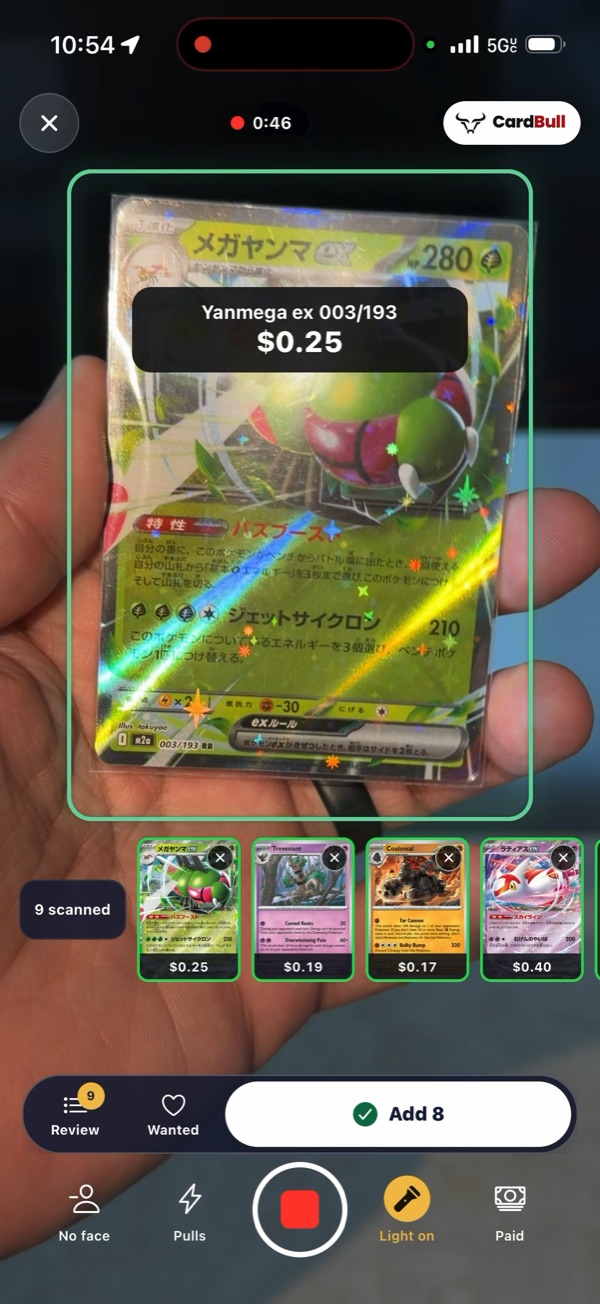
Snap one card at a time, or hold up card after card and watch each one drop into a drawer with its price. Lay 8 to 10 cards on the table and take one photo. Sweep the camera along another vendor’s case and the cards on your Wanted list light up gold. Japanese Pokémon cards are recognised and priced on their own.

  • Snap
  • Continuous
  • Bulk Scan
  • Case check
  • Price check
The scanner on an iPhone: a Japanese Pokémon card held up to the camera is outlined, named and priced, with the cards scanned so far in a row underneath.
Prices & inventory

Your whole case, valued today.

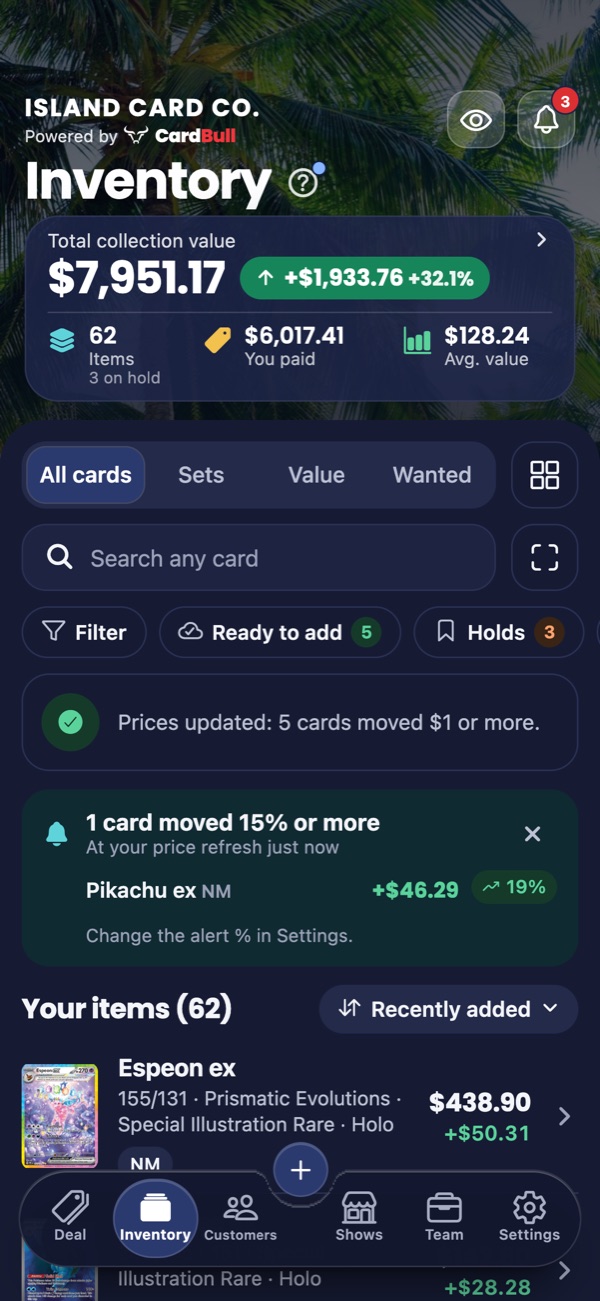
What you paid, what it’s worth now and your gain on every card, with your value over time. Prices follow the condition you pick, from Near Mint to Damaged, and refresh across your whole inventory with one tap. Graded? See the slab’s price by grade, and how many times raw it sells for.

  • Price history
  • Price movers
  • Price alerts
  • Graded slabs
  • Complete this set
Inventory on an iPhone, in dark mode: the total collection value with its gain, items and what you paid, a price alert for a card that moved 15% or more, and the list of cards with their prices.
Buy, sell, trade

Deals at your own percentages.

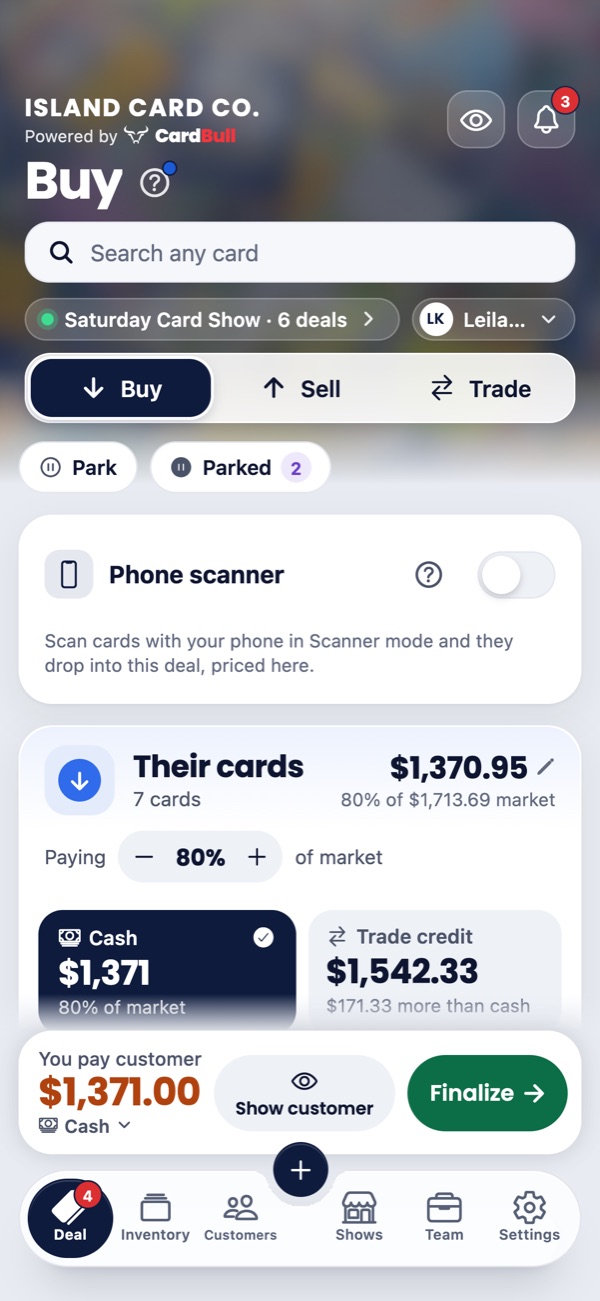
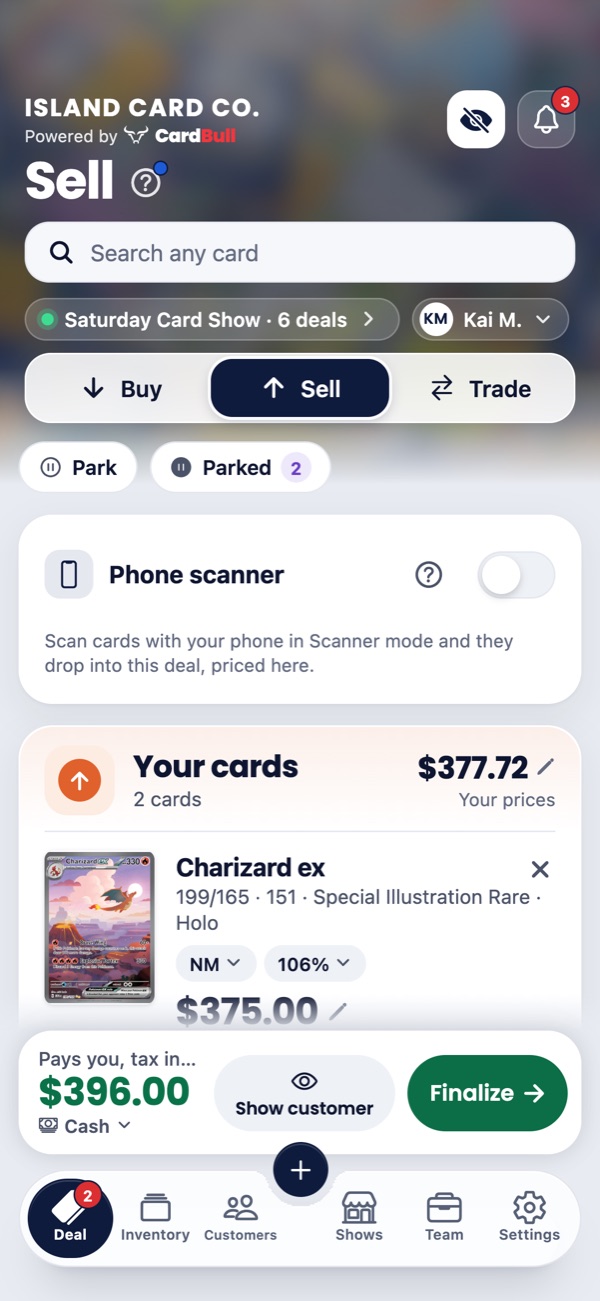
Their cards on one side, yours on the other. Trade credit and cash are worked out at your buy % and trade %. Show cash and trade credit side by side and let the customer pick. Agreed on a number? Type it and it’s spread across the cards. Turn the phone around for a summary they can accept, and it never shows your costs.

  • Cash or trade credit
  • Type the total
  • Even it out
  • Receipts
  • Park a deal
A Buy on an iPhone: the customer’s seven cards at 80% of market, with cash and trade credit offers side by side and the amount you pay.
Shows

Know what you made before you pack up.

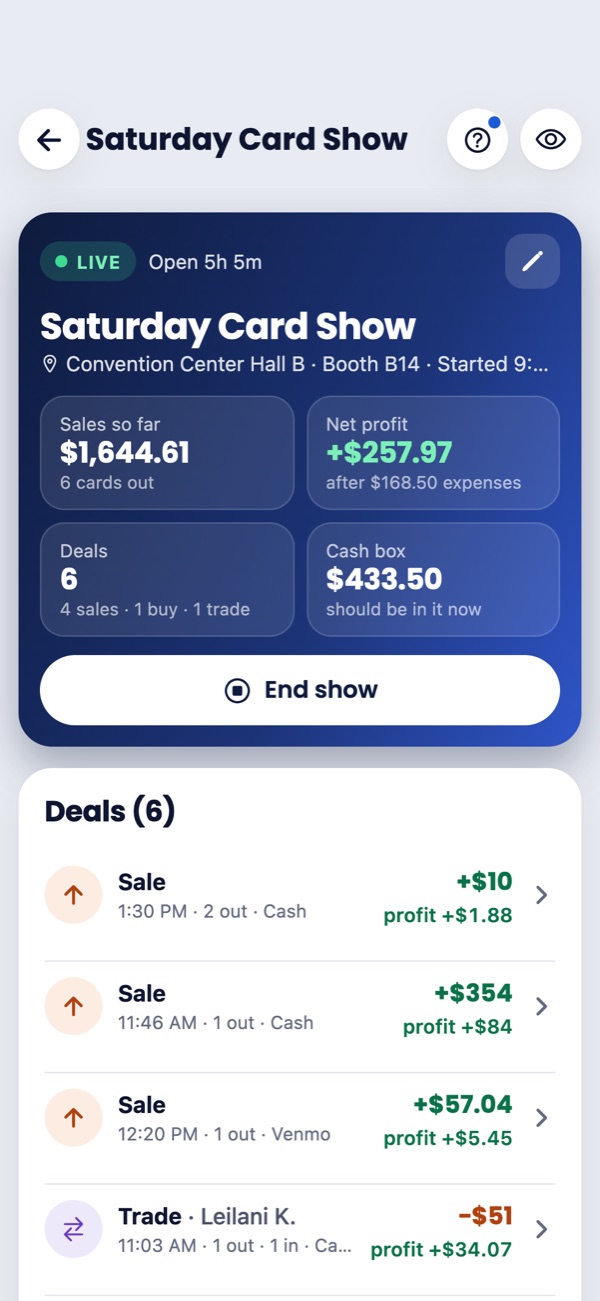
Start a show and every deal counts toward it. Sales, profit, the cash box and expenses update live all day, with the table fee taken out so profit is real profit. Every show is saved with its report, so you can see which ones are worth the table.

  • Cash box
  • Expenses
  • Show reports
  • Tax & year-end report
  • Lock Screen card
A live show on an iPhone: sales so far, net profit after expenses, the number of deals and what should be in the cash box, with the day’s deals listed below.
Record

Film your pack opening. The pulls price themselves.

Each card’s picture and price pops up as you hold it up, with what you paid for the pack and your profit or loss, and a recap at the end. The video saves to Photos, ready to post. On phones that film both ways, you’re in it too.

  • Saves to Photos
  • Your face too
  • Every pull kept
Team

Helpers at your table, on your terms.

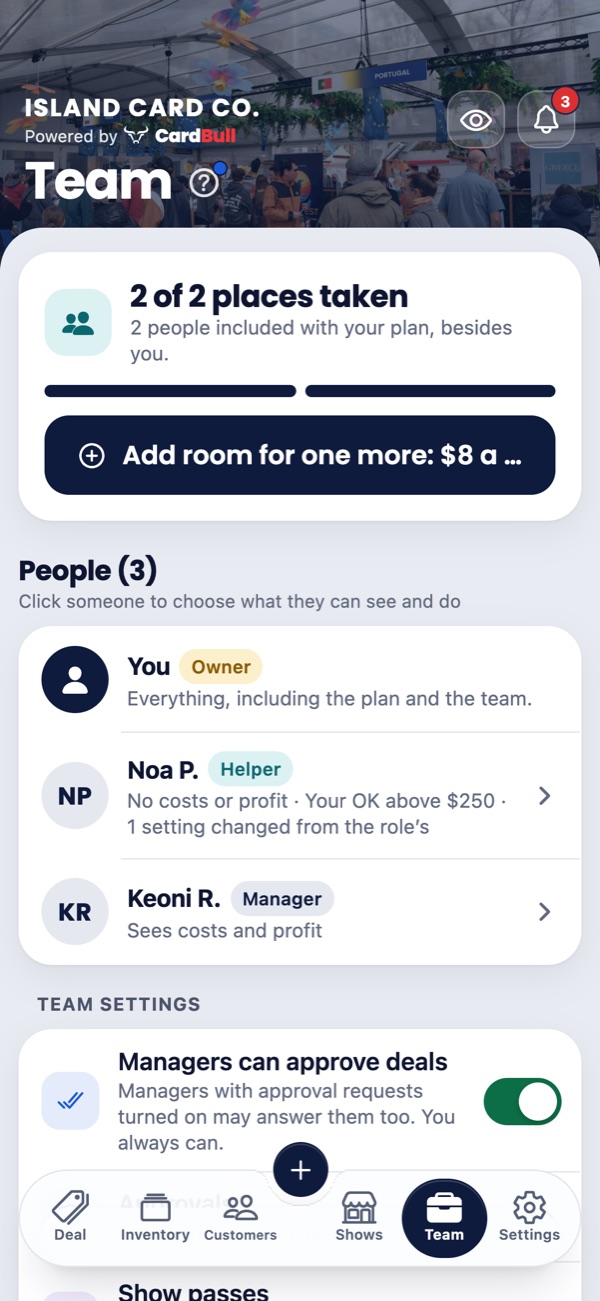
Everyone signs in as themselves. Helpers deal and scan but never see what you paid or your profit, and they can raise a price but never lower it. Deals over an amount you choose wait for your OK, and the show report says who sold what.

  • Deal approvals
  • Show passes
  • Who sold what
The Team screen on an iPhone: the owner, a helper who sees no costs or profit and needs an OK above $250, and a manager who sees costs and profit.
On your computer

The same business on a big screen.

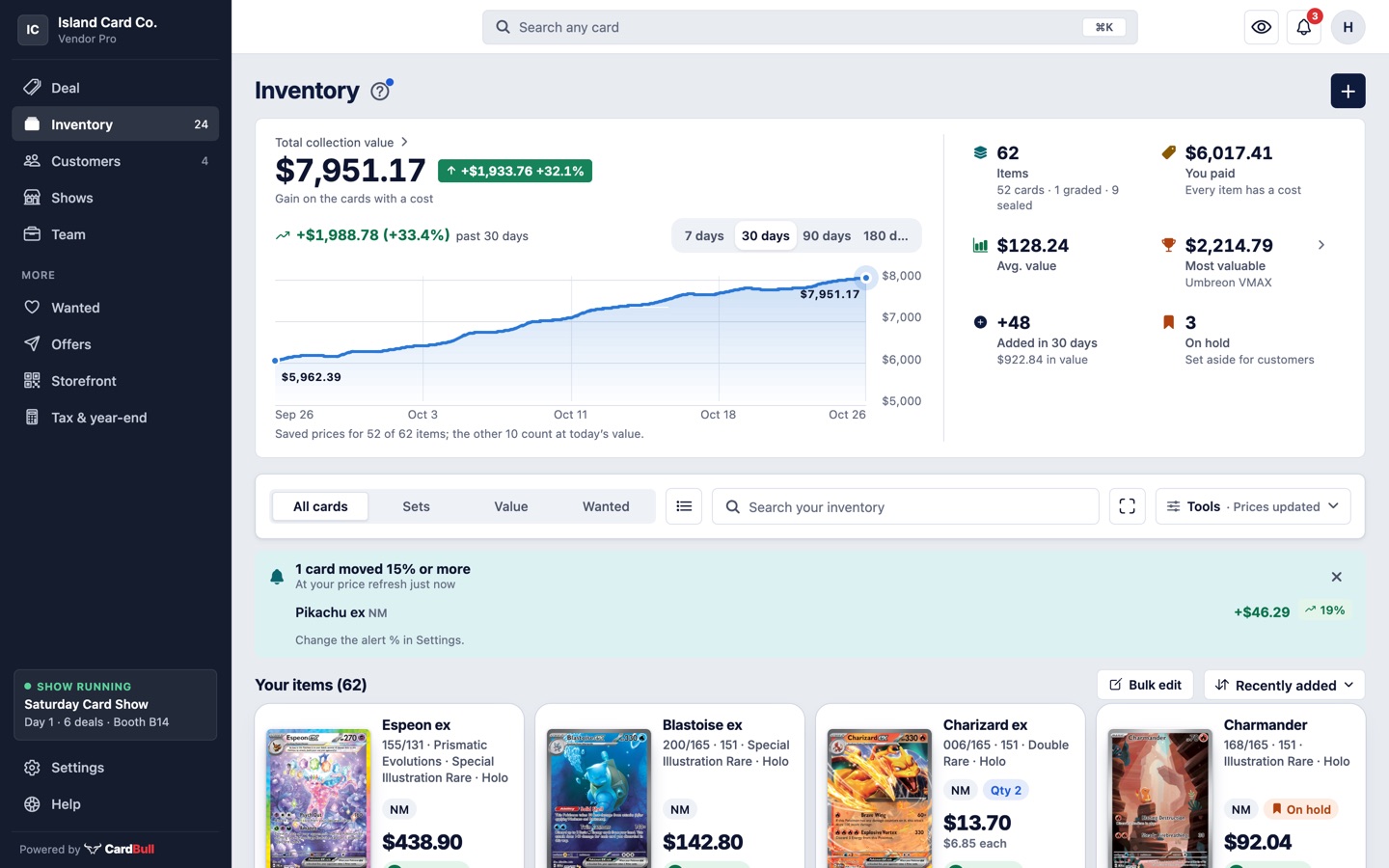
Log in at cardbullapp.com in any browser. Your deals, inventory, customers and shows are all there, across the full width of the screen, and a deal finished on the phone is on the computer about a second later. Run the deal on the computer and scan with your phone.

  • Nothing to install
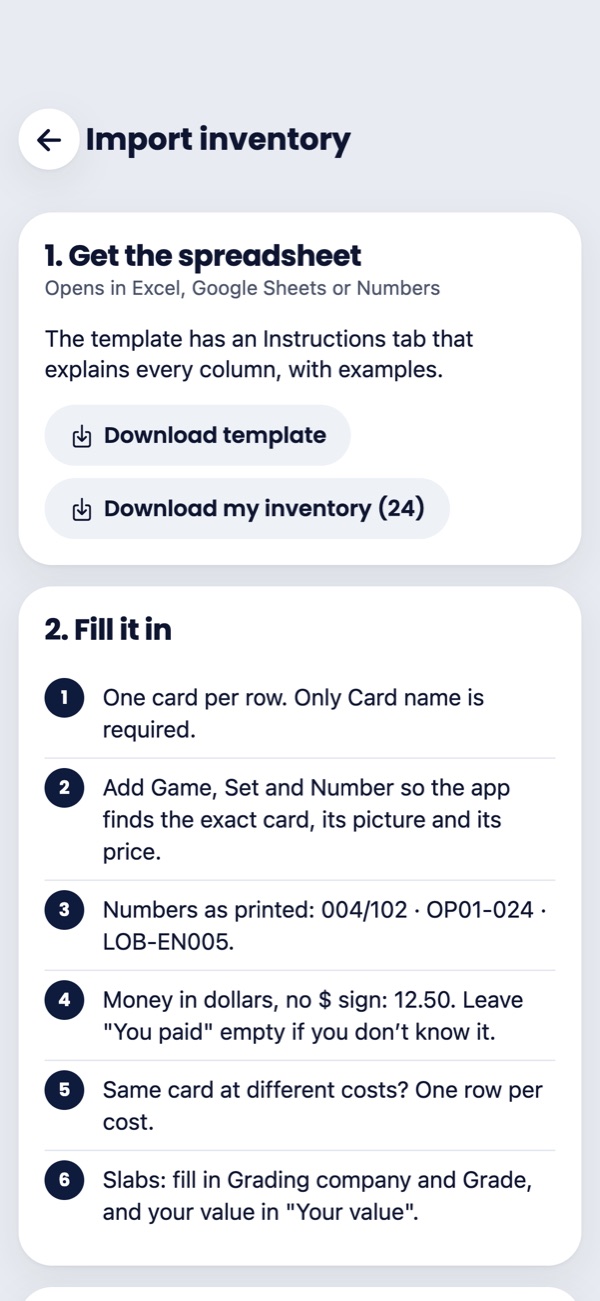
  • Import from Excel
  • Your phone as the scanner
  • Bulk edit
Inventory in a web browser on a computer: the total value, a value-over-time chart and the cards laid out as tiles across the width of the screen.

By the numbers

Games with live prices0Pokémon in English and Japanese, Magic: The Gathering, Yu-Gi-Oh! and One Piece
Conditions priced0Near Mint to Damaged, each from market
Cards at once0Sweep a case or a binder page for your Wanted cards
Days free0Vendor Pro, no card needed; 30 with a vendor’s invite
03 — And the rest

Small things, done properly.

01

Find the cards worth having

Know what a card is worth before you buy it, and never walk past one you want.

  1. 1.1

    Price check

    Scan a card to see its price and how it’s moved, without adding it to anything.

  2. 1.2

    Wanted list

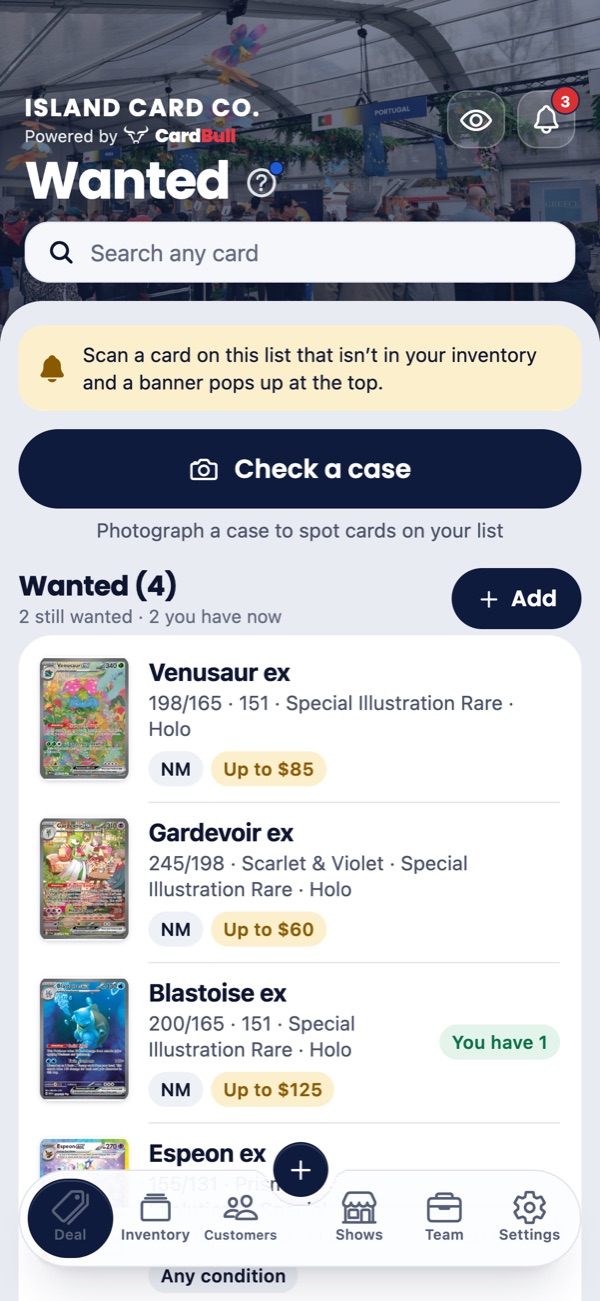
    The cards you’re hunting and the most you’d pay. Scan one, or spot one in a case, and the app tells you.

  3. 1.3

    Graded slabs

    Verify a PSA, BGS, CGC or SGC slab against the official cert and see its price by grade. Scan the slab’s barcode to fill it in.

  4. 1.4

    Find card shows

    Upcoming shows near you for the next three months, with hours and directions in your maps app. Selling at one? Set it up in a tap.

02

Sell past the table

Customers find you before the show and come back after it.

  1. 2.1

    Storefront and QR sign

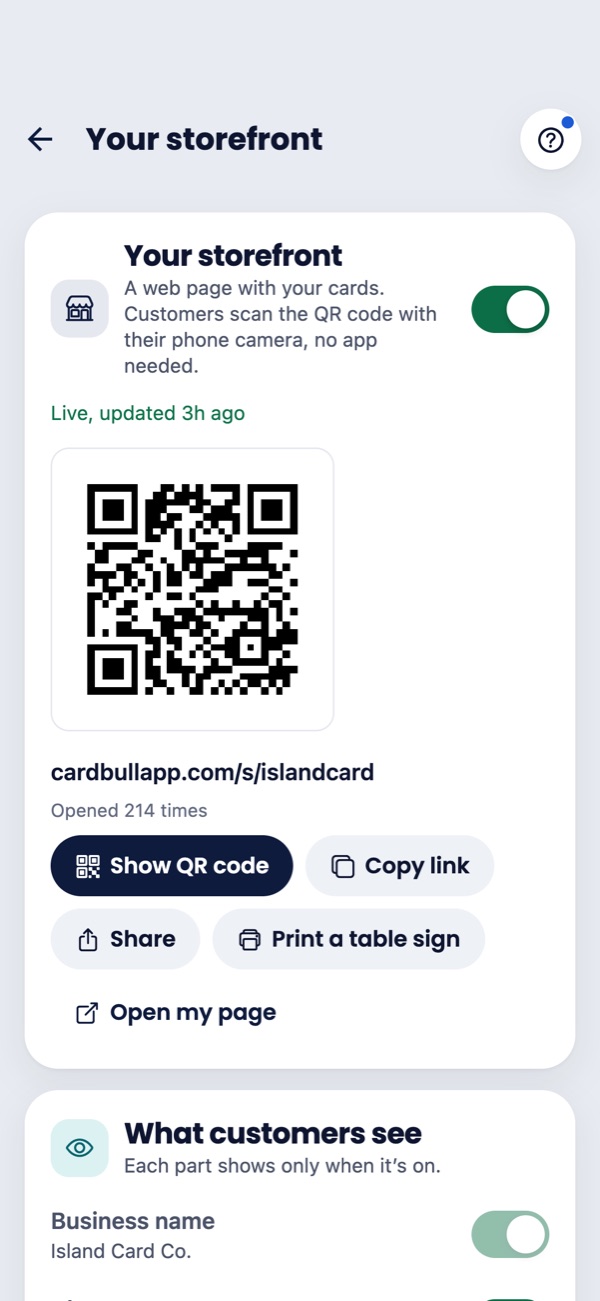
    Your cards for sale on a web page customers open by scanning the QR code at your table, plus the cards you’re buying.

  2. 2.2

    Customers and their wants

    Every deal with someone in one place, and the exact cards they’re after, flagged when you have one.

  3. 2.3

    Holds and layaways

    Set a card aside for a customer, take a deposit, and finish the sale later.

  4. 2.4

    Your show on the Lock Screen

    The show’s name, hours and booth, with Scan and New deal buttons. Never your sales.

03

Get set up fast

Bring your cards over once, then let the phone do the typing.

  1. 3.1

    Bring your cards

    Import from Excel, CSV or a Holodex export. Nothing is added until you’ve checked the list, and an import can be undone.

  2. 3.2

    Share a photo to scan it

    Share a card photo or screenshot from Photos or Safari and the app reads the card.

  3. 3.3

    Siri and Shortcuts

    Open the scanner or Bulk Scan, or start and end a show, by voice, the Action button or Back Tap.

  4. 3.4

    A ? on every screen

    Tap it to see what each button does and how to use it, with tours and a help center.

04

Your numbers stay yours

What you paid and what you made never show unless you want them to.

  1. 4.1

    Hide my numbers

    One tap on the eye hides what you paid and your profit on screen, and Face ID locks the app when you leave it.

  2. 4.2

    Sign in without a password

    A passkey with Face ID, Sign in with Apple or Google, or a code sent to your email. See every device signed in, and sign any of them out.

  3. 4.3

    No ads. No trackers.

    No third-party analytics or tracking cookies, and we never look at your deals, costs, profit, inventory or customers. Read the Privacy Policy.

  4. 4.4

    Bring a vendor, get a month free

    Share your invite link. They sign up free during launch,They get 30 days free instead of 14, and when they make their first payment, a month is credited to your bill.

04 — Pricing

Free for collectors.
Plans for every table.

Free during launch. Sign up now: collectors get Collector Pro and vendors get Vendor Pro, with nothing charged and no card needed. The prices below start later: monthly, cancel anytime.Monthly plans, cancel anytime. The free trial is 14 days of Vendor Pro, 30 if a vendor invited you, and no card is needed. Paid plans open soon, on this website and, once the app is on the App Store, in the app.Subscribe in the iPhone app through the App Store, or on this website.

Founders: Vendor Pro for $14 a month instead of $19, locked in while you stay subscribed. For the first 50 vendors who subscribe on this website. If you cancel or switch plans, founder pricing ends.

All 50 founder spots are claimed.

of 50 founder spots left

Every plan includes

  • Pokémon (English and Japanese), Magic, Yu-Gi-Oh! and One Piece, sealed products too
  • Scan cards with your iPhone camera, one at a time or a whole stack
  • Bulk Scan: many cards from one photo
  • Case check: spot your Wanted cards in a whole display case
  • Record your pack openings, with each pull’s price on screen
  • Collection value and gain, with what you paid
  • Complete this set and price movers
  • Slab tracking with cert check
  • Wanted list with scan alerts
  • Export to a spreadsheet (CSV)
  • Sync between phone and web

Collector

Track your collection, free.

Free

Start free Go to your account

No card needed.

Free, with no end date.

What’s included:

  • Up to 500 cards
  • 25 AI checks a month
  • 200 Continuous scan cards a month
  • 30 days of price history

Collector Pro

Free during launch

For serious collectors.

$4.99a month

Start free Go to your account

Free during launch. No card needed.

Free during launch. Nothing is charged.

Everything in Collector, plus:

  • Unlimited cards
  • 75 AI checks a month
  • Unlimited Continuous scan cards
  • 180 days of price history, growing
  • Graded (slab) prices
  • Price alerts
  • Apple Watch app

Vendor

Free during launch

Buy, sell and trade at your table.

$9.99a month

Start free Go to your account

Free during launch. No card needed.

Free during launch. Nothing is charged.

Everything in Collector Pro, plus:

  • 150 AI checks a month
  • Buy, sell and trade, with receipts
  • Shows, cash box and show reports
  • Buy, sell and trade rates
  • Business name, profile and receipts
  • Invite vendors
  • Print price labels
  • Tax and year-end reports
  • Excel export
  • Your show on the Lock Screen, with Scan and New deal buttons

Compare plans

What’s includedCollectorFreeCollector Pro$4.99 a monthVendor$9.99 a monthVendor Pro$19 a month
Cards500UnlimitedUnlimited
AI checks a monthExtra help naming hard-to-read cards, and Bulk Scan photos.2575150
Continuous scan cards a monthScan a stack card after card, without tapping.200UnlimitedUnlimited
Price history30 days180 days, growing180 days, growing
Graded pricesWhat a card sells for graded by PSA, CGC, BGS and more.Not includedIncludedIncluded
Price alertsHear when a card’s price moves.Not includedIncludedIncluded
Buy, sell and tradeDeals with receipts, at your table or anywhere.Not includedNot includedIncluded
Shows and cash boxNot includedNot includedIncluded
Deals open at onceStart a new deal while another one waits.Not includedNot includedOne at a time
Print labelsNot includedNot includedIncluded
Tax and year-end reportsNot includedNot includedIncluded
Excel exportNot includedNot includedIncluded
Price tiersPay a different % depending on what a card is worth.Not includedNot includedNot included
Customers, holds, layawayNot includedNot includedNot included
Storefront and offersYour own page of cards for sale, with a QR sign for your table.Not includedNot includedNot included
Team members (later)Not includedNot includedNot included
  • Change plans anytime. Nothing is deleted when you move to a smaller plan: the parts it doesn’t include are kept, hidden until you move back.
  • Invited by a vendor? Your free trial is 30 days instead of 14.
  • Pay where you like. Once plans open: by card on this website, or in the app through the App Store once it is there.Through the App Store in the iPhone app, or by card on this website. Either way the plan works in the app and on the web for the same account.
05 — Questions

Things people ask.

Still have a question? See the help center or email us.

Is there a free plan?

Yes. Collector is free, with no end date: up to 500 cards, scanning with your phone plus 25 AI checks a month, your collection’s value, the Wanted list, and sync between your phone and the web. You can start the free trial from your account whenever you like.

Do I need a credit card to start?

No. Everything is free during launch: collectors get Collector Pro and vendors get Vendor Pro, and no card is asked for. When plans open, you choose one or stay on Collector, free.

No. The free trial gives you Vendor Pro for 14 days, or 30 if another vendor invited you. You only add a card when you choose a plan, and the Collector plan never needs one. If you subscribe during the trial, the days you had left are added free when your paid plan ends.

What happens when my trial ends?

You move to Collector, the free plan, unless you’ve chosen a plan. Everything is kept: your cards stay, and deals, shows and customers come back when you pick a plan that has them.

Where do the prices come from?

Market prices update every day and follow the condition you pick (NM, LP, MP, HP or DMG), for every game we cover. They’re a guide, not an offer: you always set the final price. A price with little behind it is marked as an estimate. See Data sources & credits.

Which games does it cover?

Live prices cover Pokémon (English and Japanese), Magic: The Gathering, Yu-Gi-Oh! and One Piece, sealed products included. Anything else can be added by hand at your own price. Japanese Pokémon cards are recognised and priced on their own, kept apart from their English versions. Graded slab prices come with Collector Pro and every plan above it.

How does the card scanner work?

Point your iPhone camera at a card and it’s recognised and priced, usually in about a second. Use Snap for one card at a time, or Continuous for a stack, with each card dropping into a drawer. Bulk Scan reads 8 to 10 cards from one photo, and Case check sweeps a whole case for cards on your Wanted list. A card that isn’t recognised can be identified with an AI check, which sends its photo once you allow it. You always confirm a card before it’s added.

Can customers see my costs?

No. The customer summary and receipts never show costs or profit, and one tap on the eye hides what you paid and your profit on your own screen.

Does it work on iPad, Android or a computer?

The app runs on iPhone and iPad. The web app works on Android phones and on any computer, and everything stays in sync. The iPhone app is in beta and coming soon to the App Store.The iPhone app is on the App Store.

Can my staff use it?

Team members are coming later as part of Vendor Pro.Yes. With Vendor Pro, helpers at your table each get their own login. Helpers make deals and scan but never see what you paid or your profit, and they can raise a price but not lower it. Deals over an amount you choose wait for your OK.

How do I cancel?

Anytime. From your account on this website, or, if you subscribed in the app, under Settings › your name › Subscriptions on your iPhone. Your plan keeps working until the end of the month you’ve paid for, then you’re on the free Collector plan with everything kept.

Do you track me?

No. There are no ads, no third-party analytics and no tracking cookies in the app or on this website. Our own server notes which days your account is used and the rough area you signed up from, and never follows you to other sites or apps. We never look at your deals, costs, profit, inventory or customers. Details are in the Privacy Policy.

What happens if I lose my phone?

Your data is backed up to your account. Log in on your new iPhone, or in a browser, to restore it. You can delete your account and its backup at any time, in the app or on your account page.

Try it at your
next show.

Free during launch.14 days free.Free access with your invite. No card needed. Cancel anytime.

The iPhone app is in beta and coming soon to the App Store.The iPhone app is on the App Store. Already have an account? Log in